

Welcome to WeatherPlan Help
Find here the useful information to understand and use the MétéoPlan application.
Using WeatherPlan
Discover how to use the various features of the application, receive and view forecasts, alerts and risks.
Frequently Asked Questions
Answers to frequently asked questions about MétéoPlan are presented in this section.

🟢 Before we begin
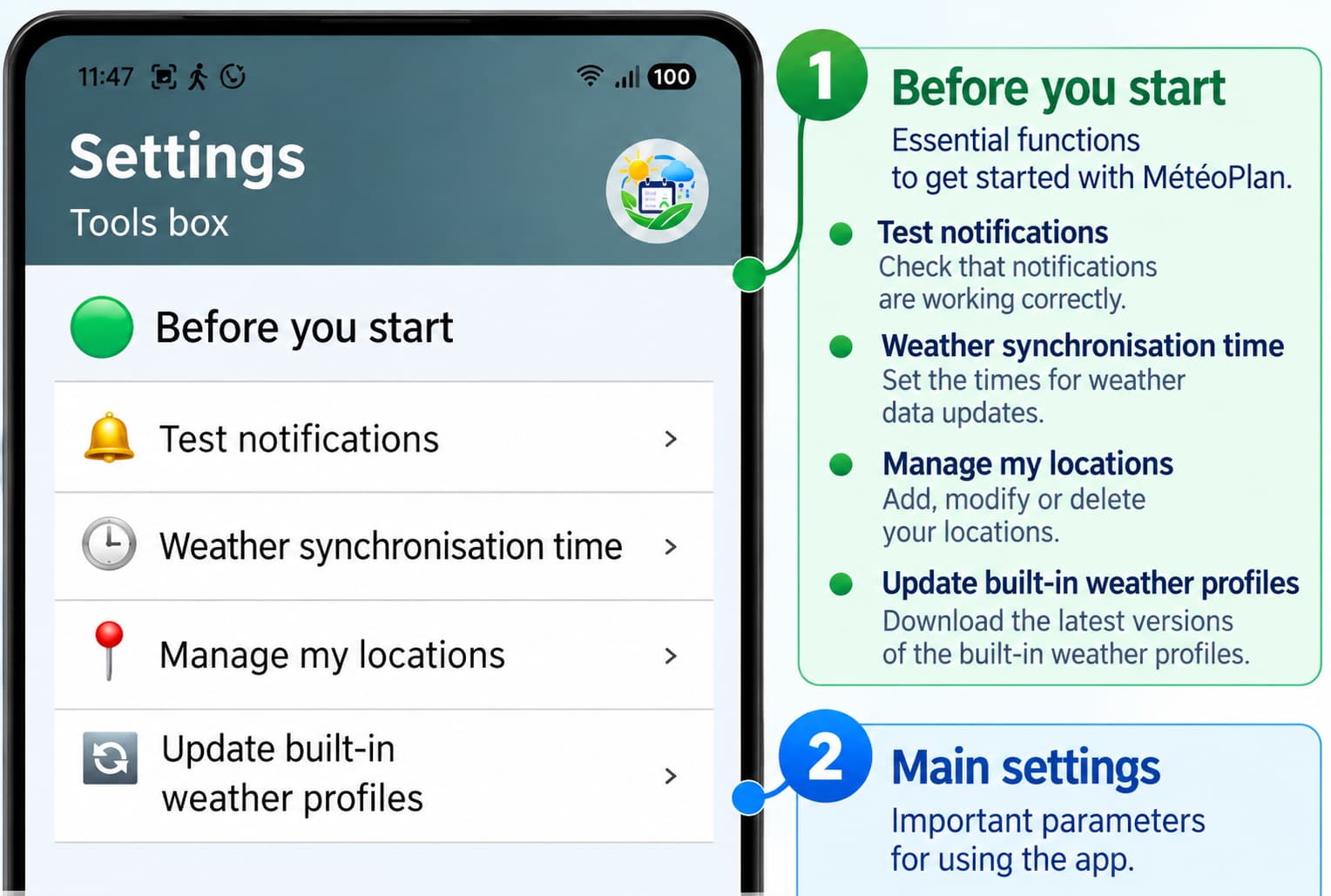
Test the notifications
→ Menu → 🔔 Test notifications: This function allows you to verify that MétéoPlan can send notifications to your device. Use the test before setting up your alerts to ensure that notifications are correctly enabled.
1- Start by ” Send a test notification “
2- If you don’t receive anything immediately, go down to “Notification settings”
3- Then allow notifications
4- Go back and select “Send a test notification”. This function is necessary to receive notifications for your alerts.
Another function you should allow is GPS . This is only necessary to record your location using GPS. The application will then no longer need this function. The application does not perform any GPS tracking.
Set weather synchronization times
→ Menu → 🕒 Sync Times: Sync times allow you to define when MétéoPlan updates the weather data for your saved locations. The updated data is then used by the application to display forecasts and perform necessary checks.
Another important setting to enable: You should allow accurate alarms . This setting is necessary for weather updates to work.
Update the integrated weather profiles
→ Menu → 🌦️ Integrated Weather Profiles: MétéoPlan offers Weather Profiles that group meteorological criteria to suit different needs. Updating the integrated profiles allows you to incorporate any changes made by MétéoPlan.
What is a weather profile? When creating weather alerts for your activities, you have the option to choose either a weather profile or to select weather parameters individually. A weather profile is a pre-grouped set of weather parameters. This may be easier for some of you.
It’s worth noting that in a weather alert, it’s better to choose only one parameter (the most important one) than to configure an alert with multiple options, as the latter is less likely to be triggered. Therefore, using weather profiles in your alerts is a tool available, but we don’t recommend it.
Manage my locations
→ Menu → 📍 Manage my locations: Locations allow MétéoPlan to save the places for which you want to view forecasts, create alerts, or analyze risks. You can add, edit, or delete your locations and set your favorite location by clicking on the star. The favorite location is the one that will always be displayed on the “Home” screen.
During installation , MétéoPlan sets a default location, Paris (FR), which allows you to immediately navigate the application and see examples of alerts. These are only examples.
You can, and we recommend, that you record your own locations and then create your own alerts.
You can then delete these installation examples.
🔵 Alerts
What is the principle behind an alert ?
MétéoPlan allows you to create and implement different types of alerts, including weather alerts and risk alerts.
The principle of a weather alert:
→ You choose the weather criteria you want to be notified about, the analysis period (“Quantity” and “Period”) , the number of days before the weather event to be notified (“Notify me”) , and the time (“Time”) at which MétéoPlan will notify you during the day. It’s so simple and easy.
What is a ” Sliding Monitoring “ alert and how do I set it up?
The best way to explain is to give an example:
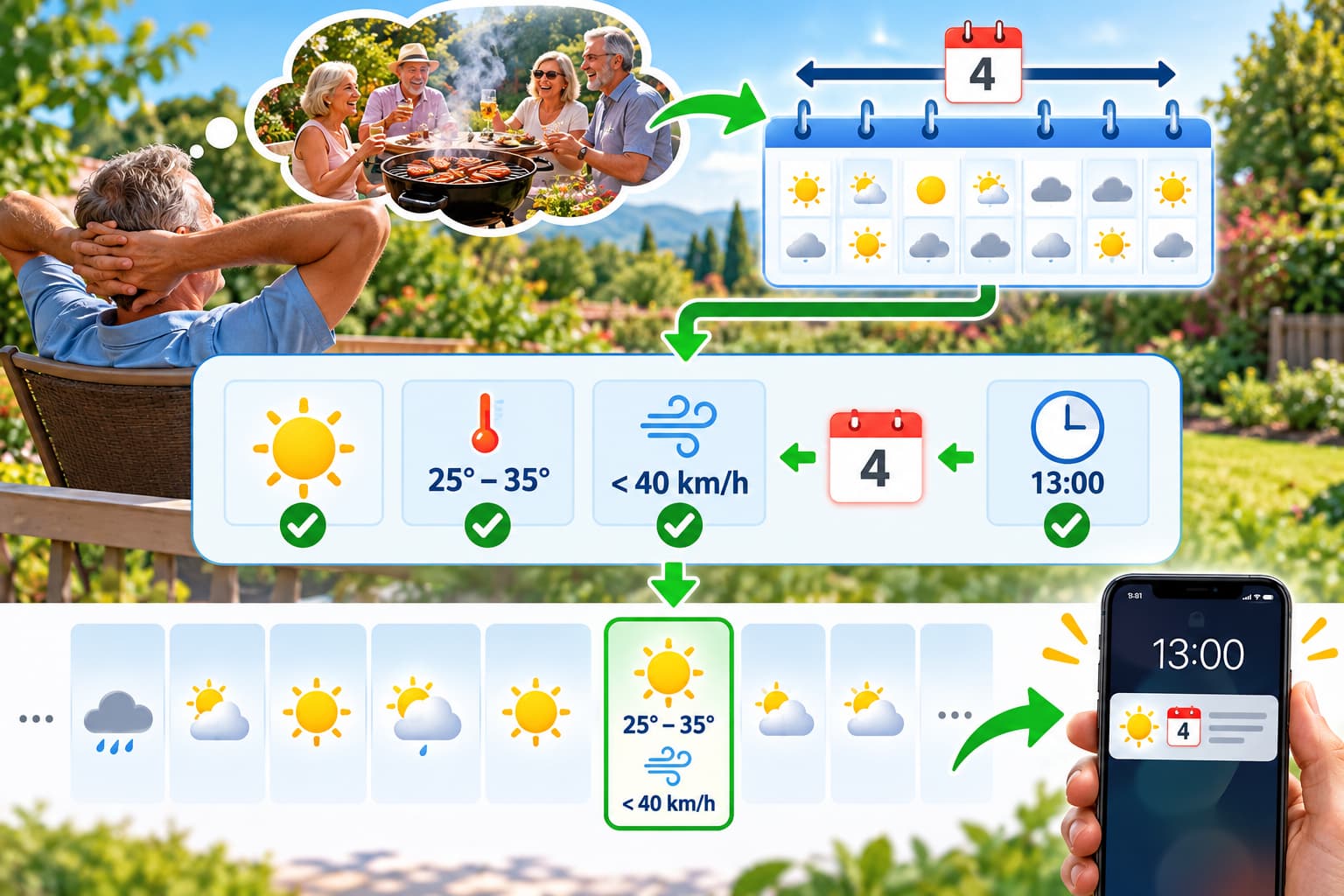
I have some free time at the moment, I’m not working, and I’d like to organize a barbecue in my garden with my retired friends within the next four weeks . The weather has been quite unpredictable lately. To plan it properly, I’d like to be notified four days in advance of a clear day with a temperature between 25° and 35°C , and most importantly, a wind speed of less than 40 km/h . To be on the safe side, I’d like a notification at 1:00 PM.
→ Here’s what you need to do → “Create” a ” Sliding Monitoring ” alert:
First screen
→ I enter a name for the alert
→ I select the “Sliding Monitoring” alert.
→ I select the Quantity : 4
→ I select the Period : Weeks
→ I select Notify me before: 4 days
→ I select Time : 1:00 PM
→ [Next]
2nd screen
→ I choose or create the location , the place of the barbecue
→ I might choose an image, it’s nicer that way
→ I choose to possibly write a note
→ [Next]
3rd screen
→ I select Wind : uncheck “Do not analyze” and choose Min: 0km/h and Max: 40km/h
→ I choose Temperature : uncheck “Do not analyze” and choose Min: 25°C and Max: 35°C, with the hourly period for temperature analysis during the day: for my barbecue, I want to analyze the temperature between 8am and 8pm.
→ I want a clear sky, so I will check the first 3 stages in Sky State .
→ [Next]
4th screen
→ I read the summary
→ [Save]
So, the monitoring is activated for the next 4 weeks , and you will be notified at 13:00 if an event [ Clear skies + Temperature from 8am to 8pm between 25° and 35° + Wind less than 40 km/h ] occurs, starting today.
You can find your created alert in the “Ongoing” alerts.
What is a “Target Date” alert and how do you set one up?
The best way is to give an example:
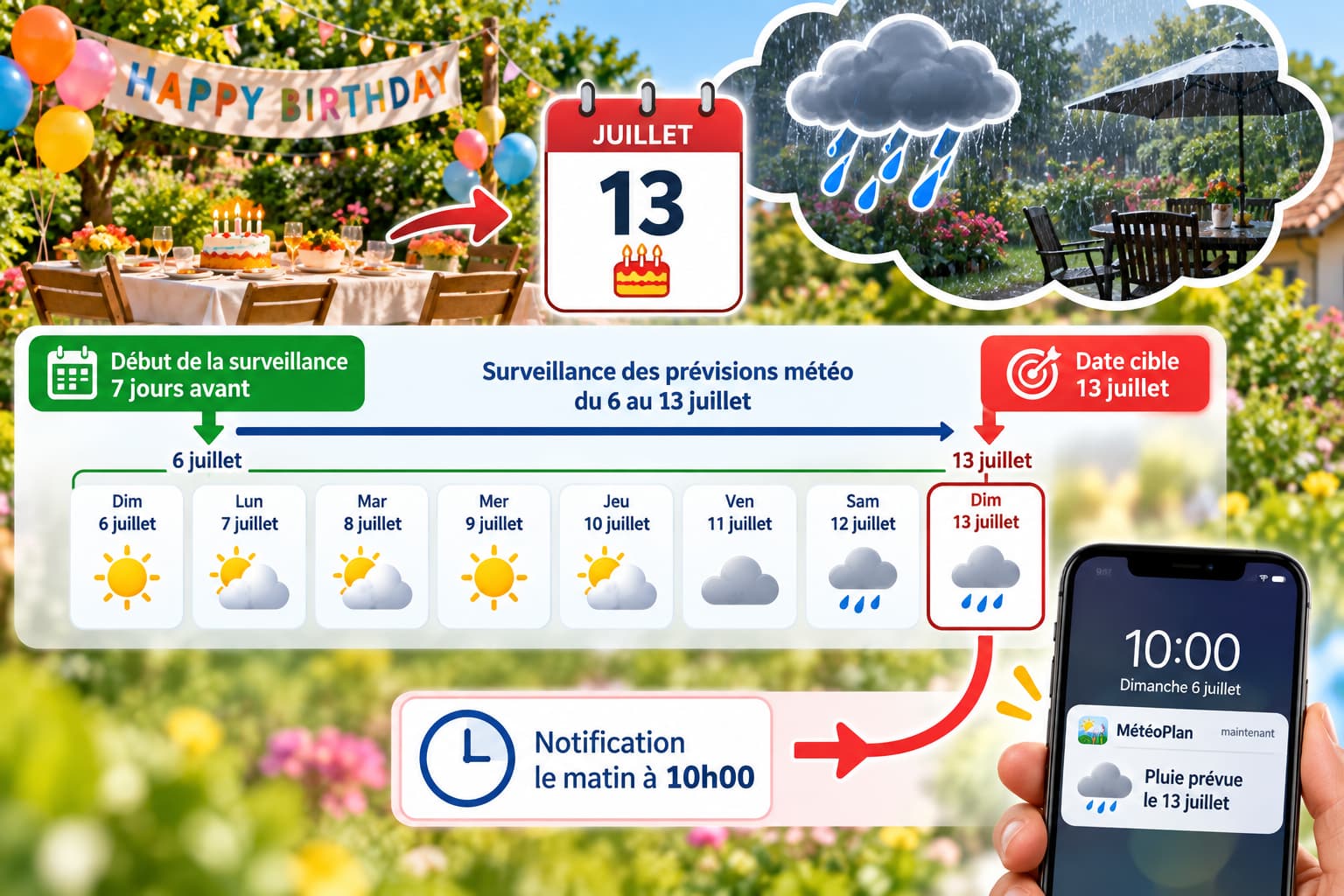
→ I have a birthday on July 13th. It’s important, it has to take place in the garden. And I’m afraid it will rain that day.
→ I want to know if it will rain on July 13th . It’s important for the organization of this celebration, and I don’t want to check the weather every day; I have other things to do.
And I want the monitoring to start on the 7th day before July 13th (so it will start on July 6th).
And I want a notification as soon as the forecast predicts rain on July 13th, in the morning at 10:00 AM.
To do this, here’s what you need to do → “Create” a ” Target Date ” alert:
First screen
→ I enter a name for the alert
→ I select the ” Target Date ” alert.
→ I select the date : July 13th
→ I select Notify me before: 7 days
→ I select Time : 10:00
→ [Next]
2nd screen
→ I choose or create the location , the place of the birthday
→ I might choose an image, it’s nicer that way
→ I choose to possibly write a note
→ [Next]
3rd screen
→ I choose Rain : uncheck “Do not analyze” and choose the rainfall differences: Min 5mm > Max xxx (the Max value must be greater than the Min value).
→ [Next]
4th screen
→ I read the summary
→ [Save]
There you go, the monitoring is activated, and you will be notified by a notification in the morning at 10:00 if a Rain event is forecast for July 13, starting from July 6.
You can find your created alert in the “Ongoing” alerts.
NOTE: If you would prefer an alert for rainfall of 0 mm (i.e., no rain), then enter: Min 0mm > Max 1mm (1 mm does not really represent rain).
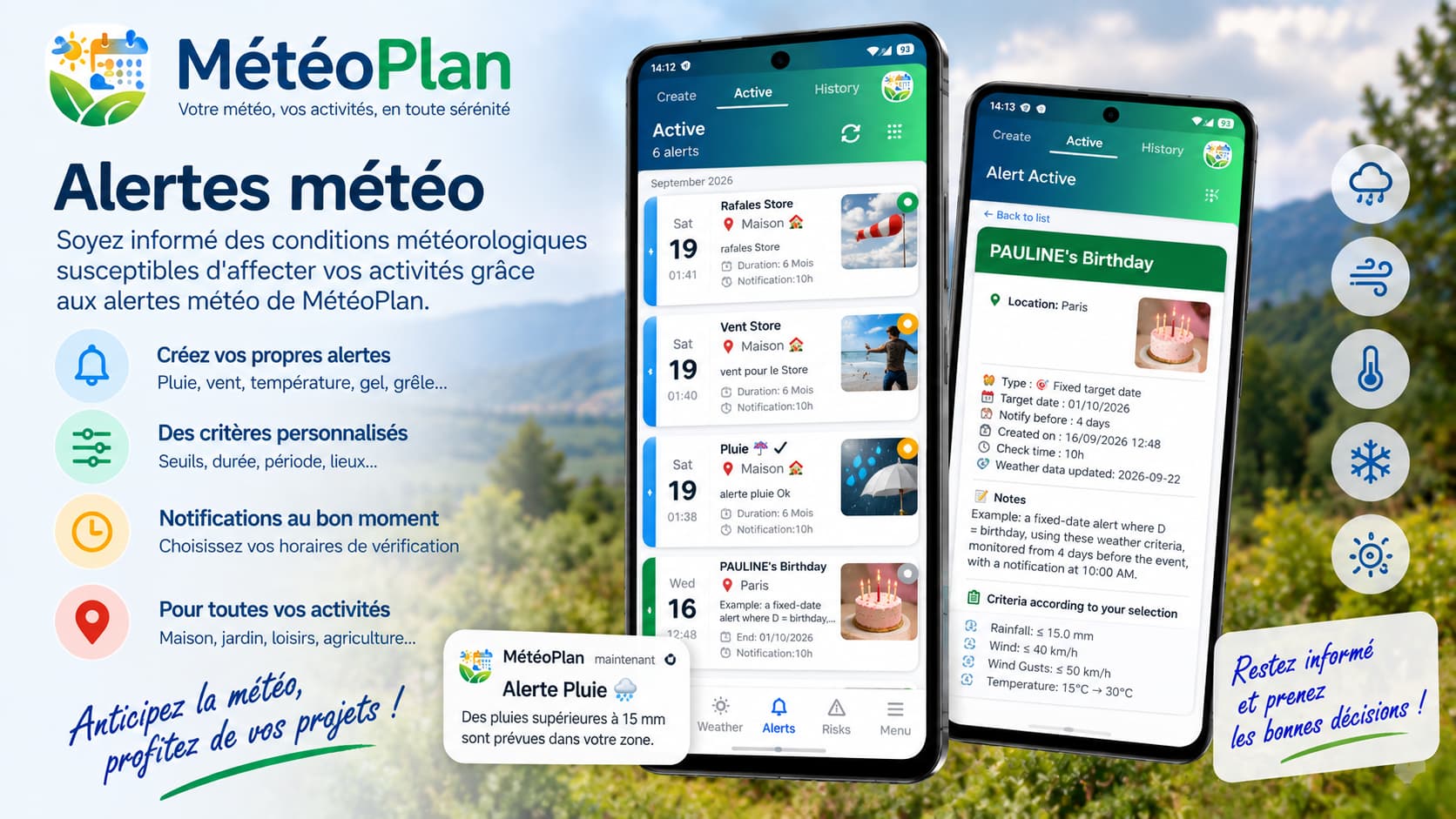
How do I check the alerts I’ve created?
→ Go to Alerts → In progress
→ You can find all your alerts and their status:
🟢 This alert will be notified today because the chosen criteria are met in the monitored period.
🟠 This alert is under active monitoring but will not be notified to date because the chosen criteria are not all met in the monitored period.
⚫ This alert is no longer under active monitoring because its monitoring period has ended.
→ To review the details of each alert, simply click on it. On the detailed information sheet, you will find a precise analysis of the weather conditions forecast for your alert, as well as the reasons for its activation or non-activation.
→ IMPORTANT: When creating an alert with multiple parameters, ALL parameters must be filled in simultaneously in the forecast to trigger a notification. If even one parameter is not filled in, the alert will not be triggered.
How do I modify , delete , and/or archive an alert?
→ Go to Alerts → In progress → Click on an alert to go to its detailed information.
At the bottom of the page, Edit | Archive | Delete
→ Edit: You can modify the alert and all its criteria
→ Archive: You can archive your alert so you can reactivate it later
→ Delete: This is the removal of the alert
What are weather profiles?
What is a weather profile? When creating weather alerts for your activities, you have the option to choose either a weather profile or to select weather parameters individually. A weather profile is a pre-grouped set of weather parameters. This may be easier for some of you.
You can create your own weather profiles by going to → Menu → Create my weather profiles.
🌤️ Weather forecast
How can I view the forecasts?
MétéoPlan lets you view current weather conditions and the upcoming forecast for each of your saved locations. You can see information such as temperature, precipitation, wind, gusts, humidity, UV index, and other weather data. Forecasts are presented for different time periods so you can track how the weather is expected to change.
How are the forecasts calculated?
Weather forecasts are generated by numerical weather prediction models. These models use extensive meteorological data and calculate the likely evolution of the atmosphere for the coming hours and days. MétéoPlan retrieves these forecasts for your location and also uses them for its alerts and various risk analyses.
Why can forecasts change?
Weather forecasts can change as new data becomes available. Weather models are recalculated very regularly and may therefore produce a different forecast than the one previously available. It is therefore normal for temperatures, precipitation, wind, or other predicted parameters to change as the date in question approaches.
What weather models are available?
MétéoPlan can use different numerical weather prediction models: WRF , AROME , ARPEGE and ICON-EU . Each model has its own characteristics and can produce slightly different forecasts.
MétéoPlan only offers an analysis of data provided by weather servers and only makes forecasts based on that data. Weather models remain predictive and are inherently constantly evolving. Forecasts are therefore subject to variability, as we have all experienced.

📍 Locations
How do I add a location?
MétéoPlan allows you to add a location in several ways. You can use your GPS position to automatically determine your coordinates, choose a location directly on a map , or manually enter the coordinates of the desired location.
To do this, go to Menu → Manage my locations .
Once the location is defined, MétéoPlan saves it so that this position can be used to display weather forecasts, alerts and risk analyses.
How do I change a location?
From the location management section, you cannot edit a location that has already been saved. You can only delete it and create a new one. Be aware that deleting a location will also delete any associated alerts.
How do I define my favorite location?
If multiple locations are saved in WeatherPlan, you can set one of them as your favorite location by clicking on the star in front of the location.
This location is then used as your primary location in the application and can be displayed as a priority on the home screen, and on screens that use weather data.
⚠️ Risks
How do weather risks work?
MétéoPlan analyzes weather forecasts and available data to identify situations that may pose a risk to people, activities, crops, gardens, or the environment.
The analysis is based on various meteorological and environmental parameters, such as temperature, precipitation, wind, humidity, UV radiation, and the duration and evolution of a phenomenon.
Depending on the risk being studied, several parameters can be analyzed simultaneously.
MétéoPlan does not replace official weather warning, alert, or safety systems. It provides supplementary information to help users anticipate expected conditions and adapt their activities if necessary.
What risks are being analyzed?
MétéoPlan groups risk analyses into several major categories: health risks , risks to agriculture and gardens , and natural risks .
Each category is based on indicators and analytical methods tailored to the phenomenon being studied. The different risks are presented separately to allow the user to more easily understand the situation predicted for their location.
The methods used for each category of risk are detailed in the specific sections of this guide: Health Risks , Agriculture & Gardens Risks and Natural Risks .
How do I activate risk notifications?
MétéoPlan allows you to choose the risks for which you wish to receive notifications, as well as the risk levels at which you wish to be alerted. By design, the choice of risk levels for notifications starts at level 4 out of 6 and above, levels that require vigilance.
This allows you to tailor notifications to your needs and avoid receiving alerts for situations that do not concern you.
A risk notification is an analysis based on available data for your location. It provides information to aid decision-making and should not be considered an official alert from the authorities. Its purpose is to encourage increased vigilance in your immediate surroundings.
How are risk levels determined?
The risk level is determined based on the characteristics of the phenomenon being analyzed and their predicted evolution. Depending on the type of risk, MétéoPlan may take into account factors such as intensity, duration, frequency, or a combination of several parameters.
The analysis criteria are established based on meteorological and environmental data as well as recognized scientific, technical or institutional references when they exist for the phenomenon under consideration.
The thresholds and criteria are therefore not necessarily the same for all risks: they depend on the phenomenon being studied and its potential effects. When recommendations vary according to countries, populations, or situations, official recommendations and guidelines from the competent authorities remain paramount.
The level displayed by MétéoPlan should therefore be understood as an informative assessment based on available data and criteria , and not as an official alert.

🌱 Agricultural & Garden Risks
How does agricultural risk work?
🌱 Agricultural risk corresponds to the analysis of meteorological and environmental conditions likely to influence the development of crops, plants and organisms associated with them.
MétéoPlan therefore does not consider a meteorological parameter in isolation. Depending on the phenomenon studied, the analysis may combine several factors such as temperature , precipitation , humidity , wind , solar radiation , vapor pressure deficit (VPD) , evapotranspiration or even certain data relating to air quality.
The objective is to identify favorable, unfavorable, or limiting conditions for a given agricultural phenomenon. For example, hot and humid conditions may be favorable to the development of certain pathogens, while wind, temperature, humidity, and rainfall may modify the application conditions of a treatment or water requirements.
This approach aligns with the principles of Integrated Pest Management (IPM) promoted by the FAO: crop condition, weather conditions, pests, and environmental factors must be considered together rather than separately. The FAO also emphasizes that field observation and monitoring of pest populations remain essential for making informed agronomic decisions.
The results displayed by MétéoPlan are therefore a decision-support analysis based on predicted conditions . They do not constitute a phytosanitary diagnosis and do not replace observation of the plot, advice from a professional, or official recommendations applicable to a given crop and product.
How does irrigation work?
💧 MétéoPlan analyzes the forecast weather conditions in order to estimate the evolution of water needs over the next five days.
The analysis takes into account, in particular, the reference evapotranspiration (ET₀) , the predicted precipitation , the temperature , the radiation , the wind , the vapor pressure deficit (VPD) as well as the state of the water available in the different soil depths analyzed.
ET₀ represents the evaporative demand of the atmosphere from a reference surface. The FAO Penman-Monteith method, described in FAO Irrigation and Drainage Paper 56, uses factors such as radiation, temperature, air humidity, and wind to determine this atmospheric demand.
In MétéoPlan, forecasts thus make it possible to distinguish between factors that increase the need for water , such as high evaporative demand or lack of rain, and those that reduce it, such as expected rainfall or still sufficient soil moisture.
The analysis also takes into account the water present in different soil layers. This distinction is important because the availability of water to the roots depends both on the amount of water present and on the characteristics of the soil.
The level displayed by MétéoPlan is an indication of irrigation needs and not a universal quantity to be applied to all crops. The actual need depends on factors such as the crop species, its stage of development, the soil, the root system, the irrigation method, and local conditions.
The general principles used to reason about the water needs of crops are described in particular by the FAO: the need for water depends on the climate, the crop and its stage of development, while irrigation supplements the water actually available, notably from rainfall.
How does the irrigation calculator work?
💧 🧮 The irrigation calculator allows you to refine the estimate of water needs based on the characteristics of the plant or tree, the soil and the planting method.
The user can specify the category and type of plant or tree , its age , the type of soil , the irrigation method , the planting method , the number of plants and the distance between plants .
The calculation also uses available meteorological conditions, including reference evapotranspiration (ET₀) . The aim is to correlate atmospheric water demand with soil and crop characteristics to obtain a more accurate estimate than using a fixed value.
An important element in the calculation is the water reserve available to the roots . Soil does not behave the same way depending on its texture: at identical moisture levels, the amount of water actually available to the plant and the ease with which the roots can extract it can differ between sandy, loamy or clay soil.
The FAO uses precisely this logic in its methods for calculating crop water requirements: ET₀ constitutes the reference climatic demand, then the characteristics of the crop, its stage of development and the soil conditions allow us to estimate the actual need of the crop.
The MétéoPlan calculator should therefore be understood as a tool for estimating and assisting in irrigation management . The result does not replace a direct measurement of soil moisture or a precise knowledge of the crop, its root system, the actual flow rate of the system, and local conditions.
How does spraying work?
🧴 MétéoPlan analyzes weather forecasts to identify, over the next five days, the time slots with the most favorable weather conditions for spraying .
The analysis focuses in particular on average wind , gusts , temperature , relative humidity , temperature difference and dew point (ΔT) , vapor pressure deficit (VPD) , UV index , cloud cover , radiation and expected precipitation .
These parameters are important because weather conditions influence the behavior of droplets after their emission, their deposition on vegetation, and the risk of drift. Wind, in particular, can move droplets away from the targeted area, while high temperature combined with low humidity can promote their evaporation.
International recommendations for good spraying practices specifically consider wind speed and direction, relative humidity, temperature, and rainfall . The FAO emphasizes that these factors influence spray deposition and the distance traveled by droplets.
MétéoPlan therefore searches for periods when several conditions are simultaneously compatible with application in favorable weather conditions. The result is presented as time slots and an indicative level allowing comparison between periods.
The score displayed by MétéoPlan is a meteorological assessment and does not constitute authorization for treatment. Before any application, it is also necessary to consider the crop, the product used, its dose, its method of application, its label, regulatory conditions, and local requirements.
MétéoPlan therefore does not determine whether a plant protection product should be used: it provides additional information on the weather conditions forecast for possibly carrying out an application .
How do disease and pest risks work?
🦠 MétéoPlan distinguishes between the analysis of diseases and that of parasites , because the conditions favorable to their development are not necessarily the same.
For diseases, the analysis takes into account factors such as temperature , humidity , precipitation , wind , wetting conditions, the temperature difference (ΔT) , VPD , and radiation . The objective is to identify meteorological configurations that may be favorable or unfavorable to the development of certain pathological phenomena.
For parasites, MétéoPlan analyzes factors such as temperature , the duration for which the temperature remains within a favorable range, humidity , wind , and precipitation . These parameters help characterize the weather conditions that are favorable or limiting for the activity or development of certain organisms.
Air quality is also taken into consideration as a complementary environmental factor. It does not, on its own, constitute a phytosanitary diagnosis; rather, it helps to complete the analysis of conditions likely to influence plant physiology and sensitivity.
This approach aligns with the principles of integrated pest management (IPM) . The FAO emphasizes that weather conditions, plant health, varietal resistance, natural enemies, and pest population trends must all be considered in the analysis. The mere presence of a pest does not necessarily warrant intervention.
The level displayed by MétéoPlan indicates a level of favorable or unfavorable conditions according to the analyzed criteria. It does not mean that a disease or pest is actually present in the plot.
On-site confirmation remains essential: observation of leaves, fruit, stems, symptoms, insects, or damage. If treatment is necessary, the decision must also comply with the agronomic and regulatory recommendations applicable to the crop and the product in question.
How does pollination work?
🌼 MétéoPlan estimates the potential for insect pollination by combining several conditions necessary for the proper functioning of their activity.
The analysis begins with phenology . MétéoPlan uses heat accumulation, expressed in growing degree days (GDD) , to estimate whether the seasonal period corresponding to the development and potential activity of a group of pollinators has been reached.
This initial stage is then influenced by the day’s weather conditions . Temperature, wind, and precipitation can alter the insects’ movement and activity patterns. Therefore, a biologically favorable period is not necessarily one where weather conditions actually permit significant activity.
MétéoPlan is finally adding a third level of analysis with air quality . The goal is not to consider only temperature or season, but also to take into account environmental conditions likely to influence the interactions between insects and plants.
The analysis is carried out separately for different groups of pollinators, including honeybees, bumblebees, mason bees, hoverflies, and butterflies . The result may therefore differ from one group to another, as their phenology and activity conditions are not identical.
The final result represents an estimate of the pollination potential for the analyzed period. It does not mean that insects are actually present on the plot, nor that pollination is guaranteed.
This distinction is important: pollination depends on the presence of pollinators, their stage of development, the flowering state of the plants, and the weather conditions at the time when the insects can be active. Local conditions and the availability of floral resources can also significantly alter the outcome.
MétéoPlan thus provides a predictive analysis of the context favorable to pollinator activity , intended in particular to help interpret a flowering period and the expected weather conditions.

❤️ Health Risks
What health risks are being analyzed?
❤️ MétéoPlan analyzes various meteorological and environmental situations that could impact health. The analyses are based on available forecasts for your location and cover the next five days. All these analyses and recommendations are derived from WHO guidelines and international scientific societies in the relevant fields. This allows for increased vigilance, especially for vulnerable individuals who may be further affected by these weather conditions. A word of advice: Consult your doctor before making any hasty decisions.
The risks currently being analyzed are:
heat , cold , variations in humidity , exposure to ultraviolet (UV) radiation , air quality , cardiovascular risk , bronchopulmonary risk and allergy risk related to pollen .
Depending on the risk being studied, MétéoPlan can analyze different parameters: temperature, perceived temperature, humidity, wind, precipitation, UV index, ozone, PM2.5 and PM10 fine particles, nitrogen dioxide (NO₂), sulfur dioxide (SO₂), carbon monoxide (CO), air quality index, pollen concentration and conditions that promote or limit the dispersion of pollutants.
These parameters are not interpreted in isolation. Their combination makes it possible to characterize a predicted environmental situation and to identify the conditions that may be associated with an increase or decrease in certain health risks.
The levels displayed by MétéoPlan are an informative assessment based on available meteorological and environmental data . They do not constitute a medical diagnosis or an individual assessment of a person’s health.
The general recommendations presented in MétéoPlan are intended to help adapt activities and exposure to the predicted conditions. In case of health problems, symptoms, or specific situations, the recommendations of a healthcare professional and the instructions of health authorities remain the priority. The WHO rightly emphasizes that the health effects of heat, cold, and pollution depend in particular on exposure and individual vulnerability; therefore, a meteorological analysis cannot replace an individual medical assessment.
How does the heat risk assessment work?
🌡️ MétéoPlan analyzes the predicted weather conditions to identify periods when heat can be a strain on the body.
The analysis takes into account temperature , humidity , wind , UV index as well as certain air quality parameters such as ozone and fine particles.
Temperature alone does not describe the full extent of thermal stress. The body must dissipate the heat produced by its activity as well as the heat received from its environment. High temperature, high humidity, weak wind, or strong radiation can limit this cooling capacity.
The World Health Organization indicates that the effects of heat depend in particular on its intensity, duration and evolution , but also on factors such as humidity, wind, thermal radiation, acclimatization and the vulnerability of people.
Significant exposure to heat can lead to dehydration, heat exhaustion, and, in severe cases, heatstroke. Heat can also worsen certain pre-existing conditions, including cardiovascular, respiratory, renal, and metabolic disorders.
MétéoPlan therefore combines available meteorological and environmental parameters to establish a forecast risk level and display general prevention measures adapted to the expected situation.
The elderly, young children, people with certain chronic illnesses, workers exposed to heat, and people who engage in significant physical activity may be at increased vulnerability.
In case of severe symptoms or suspected heatstroke, the information displayed by MétéoPlan should not delay seeking emergency medical services. This aligns directly with WHO recommendations: heat particularly affects the cardiovascular system and kidneys, and the risk depends on temperature, humidity, wind, radiation, duration, and vulnerability.
How does the risk of cold work?
❄️ MétéoPlan analyzes weather conditions likely to increase the body’s exposure to cold over the next five days.
The analysis takes into account, in particular, the air temperature , the perceived temperature , the wind and the humidity .
Wind can increase heat loss from the body and alter the perception of cold. The perceived temperature thus complements the simple air temperature by taking into account certain meteorological conditions that influence heat exchange.
Significant exposure to cold can lead to excessive loss of body heat and, in severe cases, hypothermia . Cold can also increase stress on the cardiovascular system and worsen certain respiratory illnesses.
The World Health Organization indicates that exposure to cold is associated with an increase in cardiovascular and respiratory problems. Cold can cause vasoconstriction and increase the strain on blood circulation and the respiratory system.
MétéoPlan therefore combines the available parameters in order to estimate the weather conditions favorable or unfavorable to exposure to cold and to display a forecast risk level.
The elderly, people with cardiovascular or respiratory diseases, young children and people exposed to cold for long periods may be particularly vulnerable.
The MétéoPlan result provides forecast information and is not an individual medical assessment. If signs of hypothermia or a concerning situation are present, medical assistance should be sought. The WHO documents the cardiovascular and respiratory effects of cold, including vasoconstriction, respiratory problems, and hypothermia, during significant exposure.
How does the risk of humidity work?
💧 MétéoPlan analyzes the predicted variations in humidity and their meteorological context in order to identify situations that may be favorable or unfavorable to comfort and health.
The analysis uses, in particular, temperature , relative humidity , precipitation , its intensity and its duration .
Humidity plays a key role in heat exchange between the body and its environment. When the air is very humid, the evaporation of perspiration can become less efficient, which can increase heat stress when temperatures are high.
Conversely, persistent humidity in buildings can promote condensation, mold growth, and biological contamination. The World Health Organization has established a link between persistent humidity and mold growth in buildings and an increase in respiratory symptoms, allergies, and asthma.
MétéoPlan therefore distinguishes between humid weather conditions and their potential health consequences. High humidity in the outdoor air does not automatically mean that a health problem is present.
The displayed level represents a predictive analysis of humidity conditions . It does not constitute a diagnosis of indoor air quality, the humidity level in a dwelling, or the presence of mold. The WHO does not provide a universal rule of this type for outdoor humidity. For buildings and the interiors of dwellings, the WHO primarily emphasizes the health problems associated with persistent humidity and mold.
How does UV risk work?
☀️ MétéoPlan uses the ultraviolet index (UVI) to estimate the level of potential exposure to solar ultraviolet radiation over the next five days.
The UV index is an international indicator developed jointly by the WHO, UNEP, WMO, and ICNIRP . The higher its value, the greater the potential for damage to the skin and eyes, and the more quickly harmful effects can appear.
Excessive UV exposure can cause skin and eye damage and is a major risk factor for skin cancer. Children and adolescents are particularly vulnerable to the harmful effects of excessive exposure.
The WHO recommends using sun protection when the UV index reaches 3 or higher . Protective measures include seeking shade, wearing protective clothing, a wide-brimmed hat, UV-protective sunglasses, and applying appropriate sunscreen to any exposed skin.
MétéoPlan therefore uses the predicted UV index to determine the level of exposure and display general protection recommendations.
The displayed level refers to the expected environmental exposure . It does not take into account all individual characteristics that may alter UV sensitivity, such as certain photosensitizing treatments or medical history. The WHO explicitly recommends protection from UVI ≥ 3 and defines the categories of the Global Solar UV Index.
How does the air quality risk assessment work?
🌫️ MétéoPlan analyzes the main air pollutants available in environmental data to assess the predicted air quality for your location.
The indicators analyzed may include PM2.5 fine particles , PM10 particles , ozone (O₃) , nitrogen dioxide (NO₂) , sulfur dioxide (SO₂) , carbon monoxide (CO) and an air quality index .
These pollutants do not all have the same sources or the same biological effects. Fine particulate matter can penetrate deep into the respiratory system and is associated with cardiovascular and respiratory effects. Ground-level ozone can affect the respiratory tract and worsen certain respiratory conditions. NO₂, SO₂, and CO also have documented health effects.
The WHO global guidelines for air quality cover, among other things , PM2.5, PM10, ozone, NO₂, SO₂ and CO and provide indicative levels based on available scientific data.
MétéoPlan combines predicted concentrations and available indicators to determine an air quality level and deduce general health information.
Air pollution can have different effects depending on the duration of exposure, the concentration, the mixture of pollutants, and individual vulnerability. People with respiratory or cardiovascular diseases, children, and the elderly may be particularly susceptible.
The MétéoPlan result represents a predictive environmental assessment . It is not a medical measurement and does not replace information or recommendations issued by air quality monitoring authorities. The WHO confirms that PM2.5, PM10, ozone, NO₂, SO₂, and CO are among the main reference pollutants and that pollution is associated with cardiovascular and respiratory effects.
How does cardiovascular risk work?
❤️ MétéoPlan analyzes certain meteorological and environmental conditions that may be associated with an increase in cardiovascular stress.
The analysis takes into account the perceived temperature as well as certain indicators of air pollution , including PM2.5 particles, nitrogen dioxide (NO₂) and the air quality index.
Extreme temperatures can increase the stress placed on the cardiovascular system. In hot weather, the body must increase its heat dissipation mechanisms, which can increase the strain on the heart and circulatory system.
Air pollution is also a recognized risk factor for cardiovascular disease. The WHO indicates that exposure to air pollution contributes to cardiovascular diseases, ischemic heart disease, and strokes.
MétéoPlan therefore combines certain thermal and air quality parameters in order to identify situations where several environmental factors are simultaneously unfavorable.
The result is an environmental assessment of the cardiovascular context and not an assessment of an individual’s personal medical risk. Specifically, it does not take into account age, medical history, treatments, blood pressure, or other individual clinical factors.
People with known cardiovascular disease should follow the recommendations of their healthcare professional and health authorities, especially during periods of heat or pollution. The WHO clearly establishes the links between heat, air pollution, and cardiovascular disease (PM2.5 + NO₂ + US AQI + perceived temperature, with a primary factor and a severity level).
How does bronchopulmonary risk work?
🫁 MétéoPlan analyzes meteorological and environmental conditions that may influence the exposure of the respiratory system to irritants or pollutants present in the air.
The analysis may take into account ozone , PM2.5 and PM10 particles , the air quality index , wind , humidity , pollen and certain atmospheric conditions influencing the dispersion of pollutants, including thermal inversion .
Tropospheric ozone can irritate the respiratory tract and affect lung function. Fine particles are capable of penetrating deep into the respiratory system and are associated with various respiratory and cardiovascular diseases.
Atmospheric dispersion is also an important factor. Conditions of low air mixing can promote the accumulation of certain pollutants near the ground, while stronger winds can alter their dispersion.
Pollen is another factor that can affect the respiratory system, particularly in people with allergies or asthma.
MétéoPlan combines these parameters to produce a predicted level of bronchopulmonary risk . The result describes the predicted environmental conditions and not a person’s clinical condition.
In cases of known respiratory disease, particularly asthma or chronic obstructive pulmonary disease (COPD), the doctor’s individual recommendations and prescribed treatment remain the priority. The WHO indicates that ozone and particulate matter are associated with respiratory effects, while chronic respiratory diseases can be aggravated by outdoor pollution, allergens, and certain environmental conditions.
How does the allergy risk system work?
🌼 MétéoPlan analyzes the predicted concentrations of allergenic pollen in the air in order to identify periods when pollen exposure may be greater.
The analysis can distinguish different families of pollen, for example grasses , mugwort , ragweed or other types when concentration data is available.
The risk level is determined based on the predicted pollen concentrations and their evolution over the analyzed days. A higher concentration may lead to increased exposure for people sensitive to the pollens in question.
Allergy symptoms can affect the nose, eyes, and respiratory tract. In some people, exposure to allergens can also contribute to the worsening of respiratory symptoms, particularly in cases of asthma.
Weather conditions can alter the production, dispersal, and transport of pollen. Therefore, the pollen season and climatic conditions strongly influence local exposure.
The WHO indicates that climate change and air pollution can alter pollen seasons and exacerbate certain allergic and respiratory effects. Particulate matter can also influence the allergenicity of pollen.
MétéoPlan thus provides a forecast of the level of environmental exposure to pollen . It cannot, on its own, determine whether a person will develop symptoms, as sensitivity to different pollens varies greatly from one individual to another.
For people with a known allergy, the recommendations of the healthcare professional and the prescribed treatment remain the priority. The WHO documents the interactions between pollen, air pollution and climate change, including the lengthening of certain pollen seasons and the worsening of allergic and respiratory effects.
🌪️ 🔥 🌊 Natural Hazards
How does the forest fire risk alert system work?
🔥 MétéoPlan analyzes weather conditions and the dryness of plant fuels to estimate the level of meteorological danger associated with vegetation fires for your location.
The main indicator used is the Fire Weather Index (FWI) . The FWI is a Canadian system widely used to characterize the meteorological risk of fire and has been adopted by the European Forest Fire Information System (EFFIS) to obtain a harmonized method for assessing fire risk in Europe.
The FWI does not directly measure the probability of a fire starting in a specific location. Rather, it characterizes the conditions favorable to fire behavior and spread , based on several components including the moisture content of fine fuels, the dryness of organic matter, and conditions that promote fire propagation.
The FWI system combines, in particular, the FFMC , DMC , and DC indices, which describe different levels of fuel dryness, as well as the ISI and BUI indices, which characterize fuel spread and availability, respectively. The final FWI synthesizes this information into a hazard indicator.
In the EFFIS system, fire danger is classified into several levels ranging from low to very extreme . The harmonized European thresholds use, in particular, the following FWI values: less than 11.2 for low, 11.2 to 21.3 for moderate, 21.3 to 38 for high, 38 to 50 for very high, 50 to 70 for extreme, and greater than 70 for very extreme. ([Copernicus EFFIS](https://forest-fire.emergency.copernicus.eu/about-effis/technical-background/fire-danger-forecast))
MétéoPlan supplements this analysis by examining meteorological parameters such as temperature , relative humidity , and wind . The combination of high temperatures, low humidity, and strong winds can create an aggravating situation for the fire risk.
The so-called 30-30-30 rule displayed in the application should be understood as a supplementary indicator of particularly unfavorable conditions: temperature above 30°C, humidity below 30%, and wind speed above 30 km/h. It does not constitute the calculation of the FWI and does not replace the FWI index.
It is also important to distinguish between meteorological hazards and the actual risk of fire . The ignition of a fire also depends on the presence of an ignition source, vegetation, land use, topography, and human activities. The FWI primarily describes meteorological conditions favorable to fire.
The MétéoPlan result therefore constitutes a predictive assessment of the meteorological fire danger . It does not constitute a fire declaration, a forecast of fire starting at a specific location, or an official alert.
In the event of a high or very high level, the instructions of the civil security services, local authorities and official firefighting bodies remain the priority.
How does the flood risk alert system work?
🌊 MétéoPlan analyzes hydrometeorological conditions likely to promote water accumulation or progressive soil saturation , in order to identify a flood risk trend for your location.
The analysis is based in particular on recent rainfall history and forecast rainfall. MétéoPlan uses an Antecedent Precipitation Index (API) for this purpose, which allows for a simplified representation of the hydrological memory of previous rainfall.
The idea is simple: fresh rainfall doesn’t necessarily have the same consequences depending on whether the soil has been dry for a long time or has already received significant precipitation. The API therefore allows the effect of previous rainfall to be integrated into the analysis, rather than considering only the rainfall forecast for the current day.
MétéoPlan combines this information with forecast rainfall to identify different situations: relatively dry soil, wet soil, very wet soil or situation that could become unfavorable in the event of further rainfall.
This logic aligns with modern flash flood forecasting methods: the World Meteorological Organization indicates that hazard assessment must take into account, in particular , intense rainfall and rainfall falling on already saturated soils . Operational flood forecasting systems generally combine rainfall, soil moisture, observations, and hydrological models. ([WMO](https://wmo.int/projects/ffgs))
However, the API used by MétéoPlan is a simplified indicator of the prior soil moisture status . It does not, on its own, represent a complete hydraulic or hydrological model.
The actual behavior of water depends in particular on the nature of the soil, its infiltration capacity, the slope, the topography, the presence of watercourses, drainage networks, urbanization, low-lying areas, and the characteristics of the catchment area . This information is not all available from a simple meteorological location.
The API interpretation thresholds used by MétéoPlan should therefore be considered as an indicative classification of the hydrological trend and not as a universal flood vigilance scale.
MétéoPlan therefore does not replace official flood forecasting and warning systems. In situations of heavy rainfall, rising water levels, or locally identified risks, information from the relevant meteorological, hydrological, and civil protection services should be followed as a priority.
How does the high wind and storm warning system work?
🌪️ MétéoPlan analyzes weather forecasts to identify situations that may present a risk related to strong winds, gusts, storms or associated thunderstorm phenomena .
The analysis takes into account, in particular, wind speed , maximum predicted gusts , precipitation , its maximum intensity, the possible presence of a storm signal , and the probability of lightning when such data is available.
Average wind speed and gusts should not be confused. A gust is a temporary increase in wind speed and can produce significantly greater effects than average wind speed: falling branches, moving objects, damage to light installations, or difficulties in movement.
MétéoPlan also uses the Beaufort scale as a descriptive reference for wind force. This scale links different wind speeds to observable effects on land and at sea. However, it constitutes a classification of wind force and not a complete estimate of the damage that may occur at a particular location.
The actual risk also depends on the local environment: wind exposure, terrain, vegetation, condition of infrastructure, presence of objects that could be moved, proximity to trees or fragile structures. The same gust of wind can therefore have very different consequences depending on the location.
MétéoPlan also uses, when data is available, information from probabilistic forecasting systems such as the ECMWF ENS . Unlike a single forecast, an ensemble system produces several weather scenarios to represent some of the forecast uncertainty.
The ECMWF’s ENS system currently includes 51 forecasts : one control forecast and 50 perturbed members. The range between the different scenarios provides an indication of the forecast uncertainty. ([ECMWF](https://www.ecmwf.int/en/forecasts/documentation-and-support/medium-range-forecasts))
This approach allows MétéoPlan to consider not only a deterministic value of the wind, but also the degree of confidence associated with the predicted evolution when this probabilistic information is used.
For thunderstorms, MétéoPlan can also analyze available indicators regarding the probability of lightning , precipitation, and weather signals associated with thunderstorms. These should be considered as supplementary indicators and not as a guarantee that a thunderstorm will occur at the exact location indicated.
The MétéoPlan result is a predictive assessment of potentially dangerous weather conditions . It does not constitute an official weather warning, nor a guarantee regarding the damage that may occur.
In the event of strong winds, storms or thunderstorms, the instructions of the relevant meteorological and civil security services must remain the priority.

⚙️ Application: a few tips
How do I change the language?
→ Menu → 🌍 Choose Language
How to share MétéoPlan?
You can share the link to the MétéoPlan app directly by clicking on the “Menu” icon at the bottom of your screen, the Share link 🔗 and “Menu”.
You also have the option in the notifications received to share the alert content with a friend who may have the same concerns as you, by clicking on “Share”.
Where can I review the notifications I received?
→ Menu → 📋 Received Notifications
Need help?
If you encounter a problem with the application or if you have a question, you can contact us.